Citations and references
Type @ to cite a work or to reference a figure, table, equation or section.
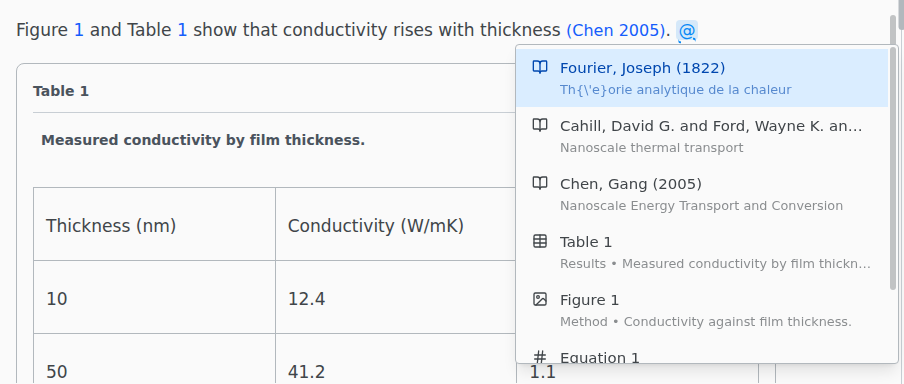
The list holds the entries of your .bib files and every labeled figure, table, numbered equation and section. Type part of a key, author, title or year to narrow it.
Edit a citation
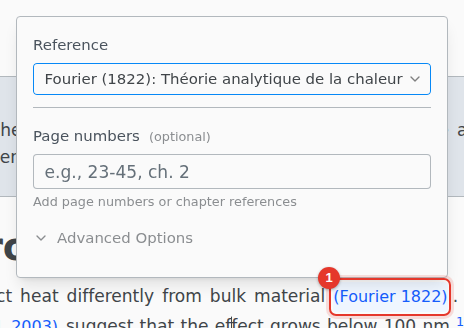
Click a citation to change the work or add page numbers. Advanced Options adds a prefix such as "see" and changes the citation style: \parencite and \textcite with biblatex, \citep and \citet with natbib.
Cross-references
Click a \ref or \eqref to jump to what it points to.
\cref, \Cref, \autoref, \pageref and \nameref open a panel instead, where Shows as switches the command. It offers only the commands your preamble supports:
| Shows as | Command | Needs |
|---|---|---|
| Number | \ref |
|
| Number in parentheses | \eqref |
amsmath |
| Page number | \pageref |
|
| Name and number | \cref |
cleveref |
| Sentence start | \Cref |
cleveref |
| Full name and number | \autoref |
hyperref |
| Title | \nameref |
hyperref |
Your bibliography
Open a .bib file to edit it as a list of entries.
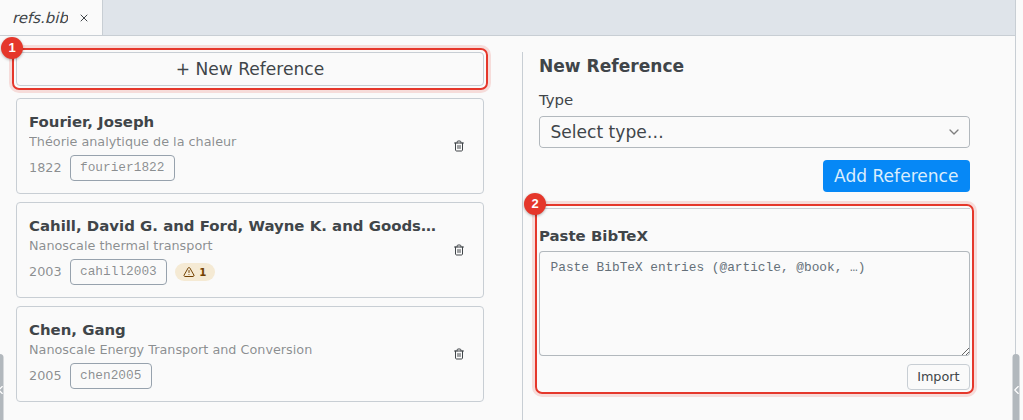
- New Reference adds an entry with a form.
- Paste BibTeX imports entries copied from a publisher's site or Google Scholar.
To cite from Zotero or find a paper by its title or DOI, see Zotero and Cite by DOI.