Snippets
Type at the speed of light (almost).
A snippet is a macro that automatically fills in text based on a trigger. For instance, you can type dint and Texpile will automatically fill in \int_{0}^{1} \, \mathrm{d}x, or however it is defined. Snippets work in the source editor, and only in the equations in the visual editor.
Prerequisite: JSON knowledge.
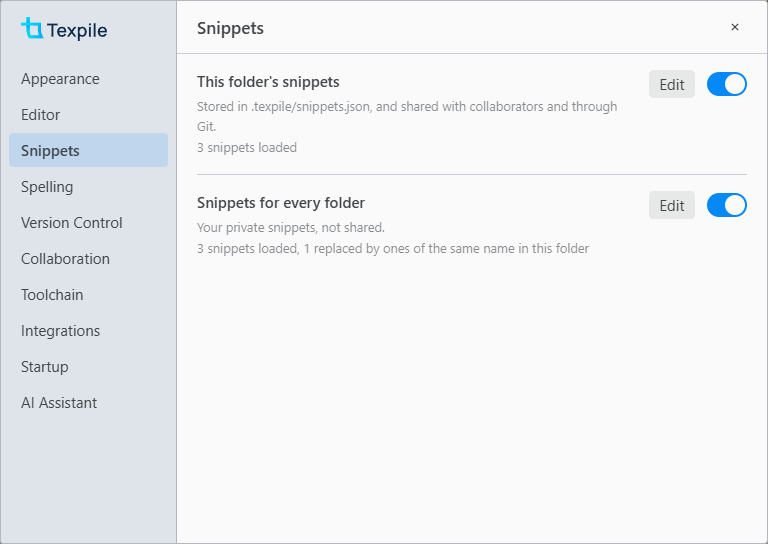
- This folder's snippets
- Command palette › Edit Project Snippets, or Preferences › Snippets › Edit Opens .texpile/snippets.json, created if missing.
- Snippets for every folder
- Command palette › Edit Global Snippets, or Preferences › Snippets › Edit Opens snippets.json in Texpile's own data folder.
Folder snippets are stored in the .texpile folder and are shared with collaborators through Git and real-time collaboration. Global snippets store your own snippets, which are not shared with anyone. If there are conflicts, Texpile follows the order of folder > global > built-in snippets. If you are a guest, you can turn off snippets via Preferences › Snippets.
An example of a snippet file
{
	"v": 1,
	"snippets": {
		"name of the snippet": {
			"prefix": "dint",
			"context": "math",
			"auto": true,
			"body": {
				"latex": "\\int_{${1:0}}^{${2:1}} $3 \\, \\mathrm{d}${4:x}$0",
				"typst": "integral_(${1:0})^(${2:1}) $3 dif ${4:x}$0"
			}
		}
	}
}
Texpile extends upon VS Code's snippet system and is compatible with VS Code's snippets.
The file
| Field | Type | Default | Description |
|---|---|---|---|
v |
1 |
1 |
The file version. |
snippets |
{ "snippet name": snippet } |
none | Required. Every snippet, under its name. The popup and the math search show each snippet by its name. |
variables |
{ "NAME": string }, or one string per language as { "latex", "typst", "markdown" } |
none | Lists for ${NAME} in regex triggers, written as alternatives such as "a|b". See Regex triggers. |
A file from VS Code, with its snippets at the top level and no snippets field, works as it is. Comments and trailing commas are allowed.
A snippet
One item in snippets.
| Field | Type | Default | Description |
|---|---|---|---|
prefix |
string or string[] | none | The trigger. Required, unless the entry has a key. |
body |
string, or { "latex", "typst", "markdown" } |
none | The text inserted, one for every language or one per language. With a math context, Markdown uses the latex body when markdown is missing. |
description |
string | none | Shown beside the popup. |
scope |
"latex", "typst", "markdown", or several joined with commas |
all three | The languages the snippet works in. |
context |
"math", "inline-math", "display-math", "text", "code", "any" |
"any" |
Where the trigger fires. code is Typst only, inside #{ }. |
auto |
boolean | false |
true expands as soon as you type the trigger. false waits in the popup for Enter. |
word |
boolean | false, true for Typst auto |
Fires only at the start of a word. |
regex |
boolean | false |
Reads the prefix as a regular expression. See Regex triggers. |
flags |
string of i, u |
"" |
Regular expression flags. |
priority |
number | 0 |
When several snippets match, the higher one wins. |
key |
string, such as "Mod-Shift-o" |
none | A keyboard shortcut that runs the snippet in the source editor. Mod is Ctrl, or Cmd on macOS. |
disabled |
boolean | false |
true turns off the global or built-in snippet of the same name. |
Syntax and variables
Every rule and variable Texpile reads. All of them go in a snippet's body, except the one marked for a regex prefix.
| Syntax | Result |
|---|---|
$1, $2 |
Places Tab moves through, in order. The same number twice is one place: it starts with the first default given for it, and what you type goes into every copy. |
${1:text} |
A place that starts with text selected. |
$0 |
Where the cursor ends. The end of the body by default. |
${1|one,two|} |
A place with a list to pick from. |
${1:outer ${2:inner}} |
A place inside a place. Tab visits the outer one, then the inner one. Typing over the outer one removes the inner one. |
${1/regex/format/flags} |
A copy of place 1, changed when Tab leaves the place: regex is matched against it and replaced with format. flags are regular expression flags, such as g. |
$1, ${1} in a format |
What group 1 of regex matched. |
${1:/upcase} in a format |
Group 1 changed. /upcase, /downcase, /capitalize, /camelcase, /pascalcase, /snakecase and /kebabcase. |
${1:+yes} in a format |
yes when group 1 matched. |
${1:-no} in a format |
no when group 1 matched nothing. |
${1:?yes:no} in a format |
yes when group 1 matched, no otherwise. |
$NAME, ${NAME} |
The value of the variable NAME, from the list below. |
${NAME:text} |
The value of NAME, or text when it is empty. |
${NAME/regex/format/flags} |
The value of NAME, changed as for a place. |
$other |
Any name that is not a variable becomes a place holding the name. |
TM_SELECTED_TEXT, SELECTION |
The selected text when the snippet runs from its key, with its own indentation. With several selections, each one gets its own copy. |
TM_CURRENT_LINE |
The text of the line the cursor is on. |
TM_CURRENT_WORD |
The word at the cursor. |
TM_LINE_INDEX |
The line number, counted from 0. |
TM_LINE_NUMBER |
The line number, counted from 1. |
CURSOR_INDEX |
With several cursors, which one this is, counted from 0. |
CURSOR_NUMBER |
With several cursors, which one this is, counted from 1. |
TM_FILENAME |
The file name, such as main.tex. |
TM_FILENAME_BASE |
The file name without its extension, such as main. |
TM_FILEPATH |
The full path of the file. |
RELATIVE_FILEPATH |
The path of the file inside the folder. |
TM_DIRECTORY |
The full path of the file's folder. |
TM_DIRECTORY_BASE |
The name of the file's folder. |
WORKSPACE_NAME |
The name of the open folder. |
WORKSPACE_FOLDER |
The full path of the open folder. |
CLIPBOARD |
Always empty. |
CURRENT_YEAR |
2026 |
CURRENT_YEAR_SHORT |
26 |
CURRENT_MONTH |
01 to 12 |
CURRENT_MONTH_NAME |
January |
CURRENT_MONTH_NAME_SHORT |
Jan |
CURRENT_DATE |
The day of the month, 01 to 31. |
CURRENT_DAY_NAME |
Monday |
CURRENT_DAY_NAME_SHORT |
Mon |
CURRENT_HOUR |
00 to 23 |
CURRENT_MINUTE |
00 to 59 |
CURRENT_SECOND |
00 to 59 |
CURRENT_MILLISECOND |
000 to 999 |
CURRENT_SECONDS_UNIX |
Seconds since 1 January 1970. |
CURRENT_MILLISECONDS_UNIX |
Milliseconds since 1 January 1970. |
CURRENT_TIMEZONE_OFFSET |
Such as +02:00. |
CURRENT_TIMEZONE_NAME |
Such as Europe/Paris. |
RANDOM |
Six random digits. |
RANDOM_HEX |
Six random hexadecimal digits. |
UUID |
A random UUID. |
LINE_COMMENT |
% in LaTeX, // in Typst. Empty in Markdown. |
BLOCK_COMMENT_START |
/* in Typst, <!-- in Markdown. Empty in LaTeX. |
BLOCK_COMMENT_END |
*/ in Typst, --> in Markdown. Empty in LaTeX. |
[[0]], [[1]] |
What the groups of a regex prefix matched. See Regex triggers. |
${NAME} in a regex prefix |
Any name from "variables", as alternatives. ${GREEK} (Greek letter names) and ${SYMBOL} (symbol names such as infty and nabla) are built in. |
\$, \}, \\ |
A plain $, } or \. LaTeX and Typst use $ for math, so a body that inserts $…$ needs \$. |
A new line in body |
Takes the indentation of the line the snippet starts on. A tab at the start of a body line adds one indentation step. |
All fields must be JSON escaped. For instance, "\\frac" inserts \frac.
Regex triggers
With "regex": true, the prefix is a regular expression matched against the text you just typed, up to the cursor. [[0]], [[1]] in the body insert what its groups matched. Regex triggers require "auto": true.
"Subscript": {
	"prefix": "([A-Za-z])(\\d)",
	"regex": true,
	"auto": true,
	"context": "math",
	"body": { "latex": "[[0]]_{[[1]]}", "typst": "[[0]]_[[1]]" }
}
Regex patterns are run per keystroke. As such, a horribly written one can freeze the editor.
Visual editor math equations
Auto snippets will trigger in visual editor math. Pressing Ctrl Space will open up the math search menu, in which you can search for your snippets.
Built-in snippets
Texpile has some built-in snippets:
| Trigger | LaTeX | Typst |
|---|---|---|
@. |
\cdot |
dot.op |
@* |
\times |
times |
@/ |
\frac{}{} |
()/() |
@8 |
\infty |
oo |
@0 |
^\circ |
degree |
@6 |
\partial |
partial |
@- |
\bigcap |
inter.big |
@= |
\equiv |
equiv |
@< |
\leq |
lt.eq |
@> |
\geq |
gt.eq |
@a |
\alpha |
alpha |
@b |
\beta |
beta |
@g |
\gamma |
gamma |
@d |
\delta |
delta |
@e |
\epsilon |
epsilon.alt |
@l |
\lambda |
lambda |
@s |
\sigma |
sigma |
@p |
\pi |
pi |
@o |
\omega |
omega |
@^ |
\hat{} |
hat() |
@_ |
\bar{} |
macron() |
@% |
\frac{}{} |
()/() |
@@ |
\circ |
compose |
@; |
\dot{} |
dot() |
@: |
\ddot{} |
dot.double() |
@2 |
\sqrt{} |
sqrt() |
@I |
\int_{}^{} |
integral_()^() |
@| |
\Big| |
|
@+ |
\bigcup |
union.big |
@, |
\nonumber |
|
@c |
\chi |
chi |
@ve |
\varepsilon |
epsilon |
@f |
\phi |
phi.alt |
@vf |
\varphi |
phi |
@h |
\eta |
eta |
@i |
\iota |
iota |
@k |
\kappa |
kappa |
@m |
\mu |
mu |
@n |
\nu |
nu |
@vp |
\varpi |
pi.alt |
@q |
\theta |
theta |
@vq |
\vartheta |
theta.alt |
@r |
\rho |
rho |
@vr |
\varrho |
rho.alt |
@vs |
\varsigma |
sigma.alt |
@t |
\tau |
tau |
@u |
\upsilon |
upsilon |
@& |
\wedge |
and |
@x |
\xi |
xi |
@y |
\psi |
psi |
@z |
\zeta |
zeta |
@D |
\Delta |
Delta |
@F |
\Phi |
Phi |
@G |
\Gamma |
Gamma |
@Q |
\Theta |
Theta |
@L |
\Lambda |
Lambda |
@P |
\Pi |
Pi |
@X |
\Xi |
Xi |
@Y |
\Psi |
Psi |
@S |
\Sigma |
Sigma |
@U |
\Upsilon |
Upsilon |
@W |
\Omega |
Omega |
@( |
\left( \right) |
lr(( )) |
@{ |
\left\{ \right\} |
lr({ }) |
@[ |
\left[ \right] |
lr([ ]) |
You can turn them off by adding "disabled": true:
{
	"v": 1,
	"snippets": {
		"@a": { "disabled": true }
	}
}
Errors
Texpile skips broken entries and loads the rest of the file.
| Message | Fix |
|---|---|
| The file is not valid JSON: line 5, column 24 (…) | Fix the JSON near that line and column, usually a missing comma or quotation mark. Until then, Texpile keeps using the last version that loaded. |
| The file needs to start with { and end with }. | Put the entries inside one pair of braces. |
| Unsupported file version ("v": 2). | A newer Texpile wrote the file. Update Texpile, or set "v": 1. |
| Each entry needs to be in { }, like "Name": { "prefix": "ff", "body": "text" }. | Write the entry as a name followed by its fields in braces. |
| Has no "body", the text it inserts. | Add a body. |
| "body" needs to be text in quotes, or one text each for "latex", "typst" and "markdown". | Write body as a string, or as an object of strings. |
| "body" has "…", which is not a language. Use "latex", "typst" or "markdown". | Use latex, typst or markdown as the names inside body. |
| The … "body" needs to be text in quotes. | Write that language's body as a string. |
| Has no "prefix", the text you type to use it. | Add a prefix or a key. |
| "prefix" needs to be text in quotes, or a list of them in [ ]. | Write prefix as a string or a string[]. |
| "scope" needs to be text naming languages, like "latex,typst". | Write scope as a string. |
| "context" needs to be one of "math", "inline-math", "display-math", "text", "code", "any". | Use one of the listed values. |
| "…" needs to be true or false, without quotes. | Write auto, word, regex or disabled as true or false. |
| "flags" can only hold i (ignore case) and u (Unicode). | Remove the other letters. |
| "priority" needs to be a number, without quotes. | Remove the quotes. |
| "key" needs to be text, like "Mod-Shift-o". | Write key as a string. |
| "description" needs to be text in quotes. | Write description as a string. |
| The "prefix" pattern is not a valid regular expression (…). | Fix the pattern. The text in brackets says what is wrong. |
| A "regex" pattern needs "auto": true as well, because patterns only expand as you type. | Add "auto": true. |
| The pattern uses ${NAME}, but "variables" has no NAME for latex. Add it there, or take it out of the pattern. | Add the list under variables, or take it out of the pattern. |
| Needs to be in { }, with a named list in each entry. | Write variables as an object of named lists. |
| Needs to be text, or one text per language. | Write the variable as a string, or as an object of strings. |
Warnings
A snippet with a warning still loads and works, but most likely will not work right.
| Message | Fix |
|---|---|
| "dif" is already a word in Typst math, so with this snippet a plain dif can no longer be typed in an equation. Pick another trigger. | Pick another trigger, or limit the snippet to LaTeX with "scope": "latex". |