Source editor
Edit the Typst directly. Functions, labels, citation keys and file paths complete from your whole project.
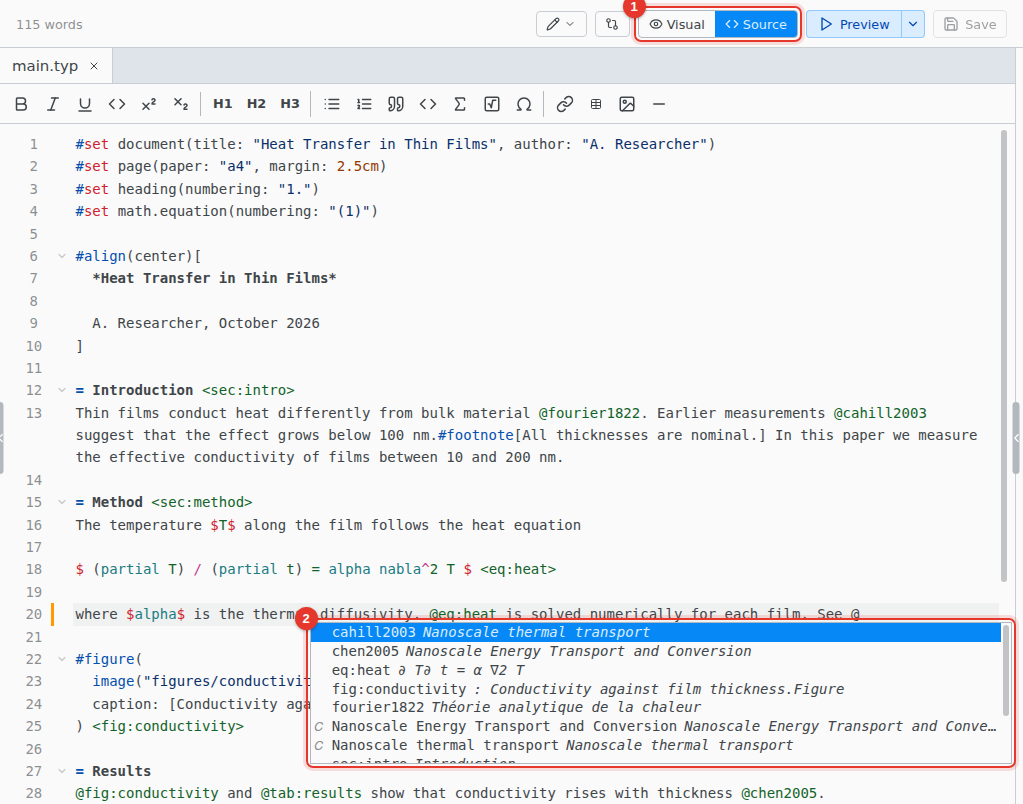
- Source. Switch to the source editor.
- Completion. Opens as you type. Ctrl Space opens it any time.
Hover a name to see what it is, or, inside a function call, its arguments. The swatch beside a color opens a color picker. The Ω button on the toolbar finds a symbol by name or meaning.
Go to definition, rename and fixes
| F12 | Go to where a name, label or function is defined, or open the file a path names |
| F2 | Rename a name, label or function in every file. Ctrl Z undoes it in the open file only. |
| AltEnter | Quick fixes where an error or hint is, such as creating a missing file |
| CtrlSpace | Show suggestions |
Format Document
Format › Format Document (typstyle)… tidies the whole file. It works in the source editor only.
Keyboard shortcuts
On macOS, use Cmd for Ctrl. Select text first to wrap it.
| CtrlB | *bold* |
| CtrlI | _italic_ |
| CtrlU | #underline[] |
| Ctrl. | #super[] |
| CtrlShift, | #sub[] |
| CtrlM | $ $ |
| CtrlAlt1 | = heading, with 2 to 6 for the levels below |
| CtrlD | Select the next match |
| CtrlAltUp | Add a cursor above |
| CtrlAltDown | Add a cursor below |