Texpile
FeaturesDocsDownload
English
简体中文
繁體中文
Overview

Get started

  • Installation
  • Getting started
  • A tour of the window
  • Command palette

LaTeX

  • Overview
  • Visual editor
  • Equations
  • Tables
  • Figures and images
  • Citations and references
  • Source editor
  • Compiling
  • Live preview

Typst

  • Overview
  • Visual editor
  • Equations
  • Tables
  • Figures and images
  • Citations and references
  • Source editor
  • Compiling
  • Live preview
  • Export
  • Templates

Markdown

  • Overview
  • Visual editor
  • Source editor

Editor tips

  • Typing and selecting
  • Paste and drop
  • Spell check

Workflow

  • Build and preview
  • Projects and files
  • Version control

Review and collaboration

  • Comments
  • Real-time collaboration

AI and integrations

  • AI Assistant
  • Integrations

Customize

  • Preferences
  • Themes
  • Keyboard shortcuts

Troubleshooting

  • General
  • LaTeX
  • Typst
  • Git
  • Shared sessions

Reference

  • Limits
  • Privacy
  • Formats
  • What's new
Get started

Command palette

A place to search the editor's actions and your files. Press Ctrl K (Cmd K on macOS), or click the window title.
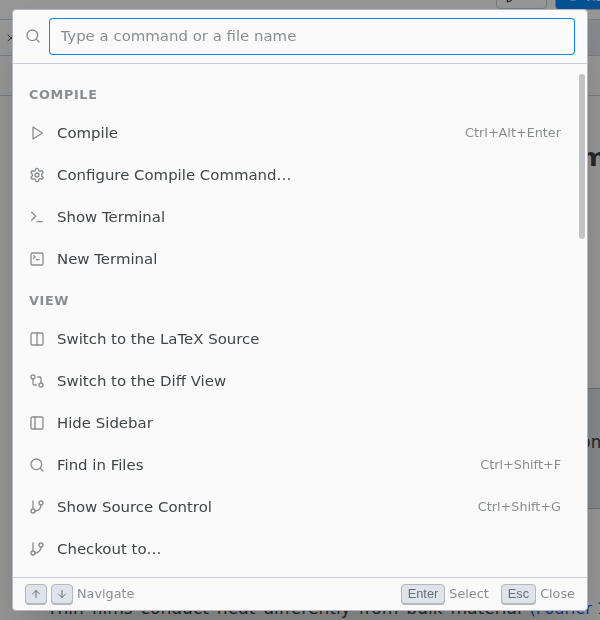
The command palette open on the Compile and View commands

Ctrl T (Cmd T) searches files only.

Previous A tour of the window Next LaTeX