Source editor
Edit the LaTeX directly. Commands, labels, citation keys and file names complete from your whole project.
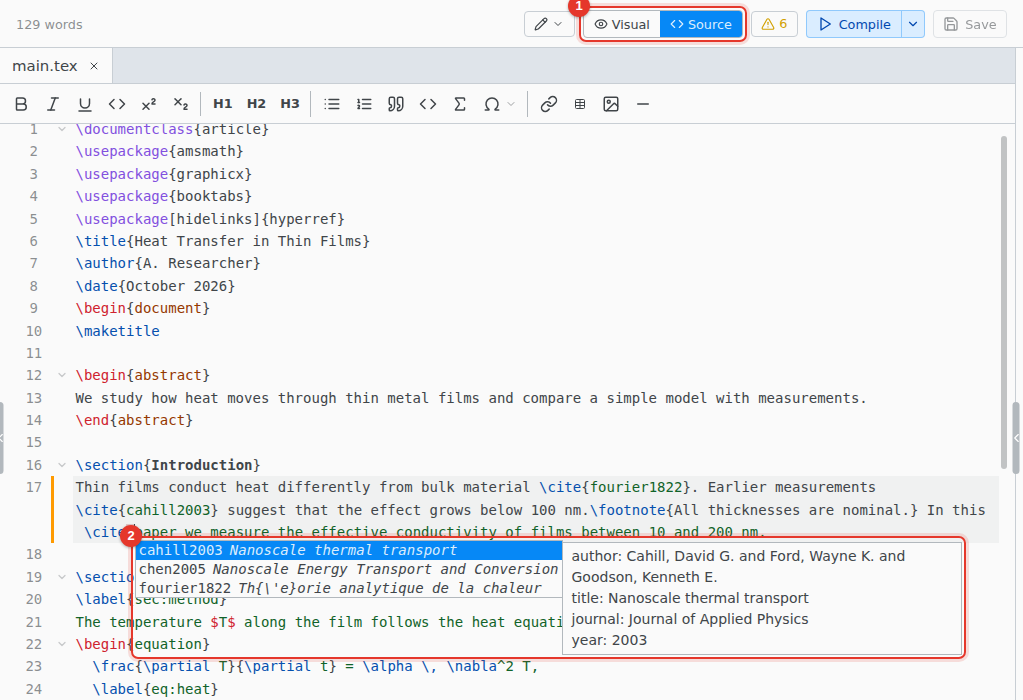
- Source. Switch to the source editor.
- Completion. Opens as you type. Ctrl Space opens it any time.
Completion covers commands (your own \newcommand macros too), environments, packages, labels, citation keys and file names. In \cite{, search by key, title or author. Type @ and a letter for a symbol: @a offers \alpha.
Go to definition and hover
F12, or Ctrl Click, on a label, a citation key, one of your own commands, or a file in \input opens where it is defined.
Hovering shows the citation's entry, the image of an \includegraphics, or the typeset equation a \ref points to.
Math preview
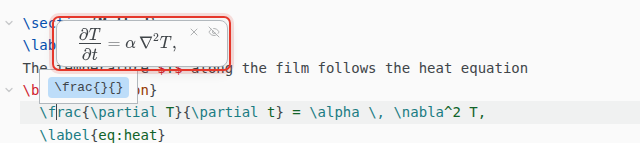
The equation under the cursor shows typeset above it. Esc hides it.
Symbols
Insert › Symbol… finds a symbol by command (subsetneq), by meaning (not equal) or by package. It shows the \usepackage line the symbol needs and offers to add it.
Format Document
Format › Format Document tidies the indentation. Only spacing changes.
Keyboard shortcuts
On macOS, use Cmd for Ctrl. For Vim or Emacs keys, see File › Preferences… › Editor › Keybindings.
| CtrlSpace | Show suggestions |
| F12 | Go to definition |
| CtrlD | Select the next match |
| CtrlAltUp | Add a cursor above |
| CtrlAltDown | Add a cursor below |
| CtrlB | \textbf{} |
| CtrlI | \textit{} |
| CtrlM | \( \) |
| CtrlShiftM | \[ \] |
| CtrlAlt1 | \section{}, with 2 and 3 for the levels below |