Version control
Source Control commits your work with git when you choose. Version History keeps a copy of each file on every save, with or without git.
Requires git, for Source Control
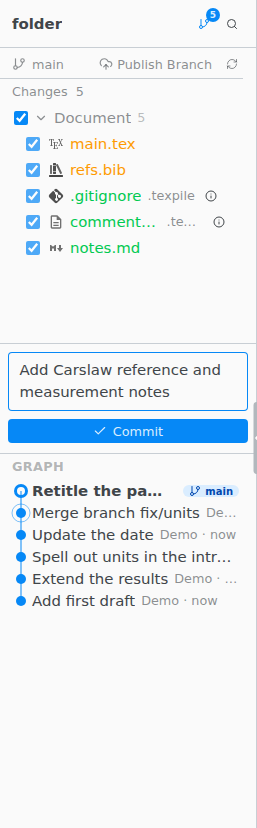
Ctrl Shift G opens Source Control (Ctrl on macOS too).
Commit
- Files the build makes, such as
.auxand.log, are listed under Build and left out of commits. Add to .gitignore on the group tells git to ignore them for good. The group leaves out your PDF. - A file you untick stays out of commits, across restarts, until it matches the last commit again.
- Files under
.texpile/show Managed by Texpile. Leave them to Texpile, exceptsnippets.json, which is yours to edit. - If git has no name and email yet, the first commit asks for them and saves them for every project on this computer.
- Discard Changes keeps a copy in Version History first and offers Undo. A new, uncommitted file goes to the Trash.
Sync
Sync brings in the commits made elsewhere, then sends yours. If uncommitted changes block it, Commit & Sync commits them first. Switching branches with Checkout to… in the command palette offers Commit & Checkout the same way.
While the window is in front, Texpile checks for new commits every 3 minutes, without asking you to sign in.
When both sides changed the same lines, see Merge conflicts.
Clone
File › Clone Repository… takes a clone URL, the repository's web page on GitHub, GitLab or Bitbucket, a git clone command copied from a README, or an Overleaf project page.
Not available
Use git in the terminal to create, rename, delete or merge branches, stash, rebase, cherry-pick, tag, blame, amend a commit, stage part of a file, or manage submodules and Git LFS files.