Source editor
Edit the LaTeX directly. Commands, labels, citation keys and file names complete from your whole project.
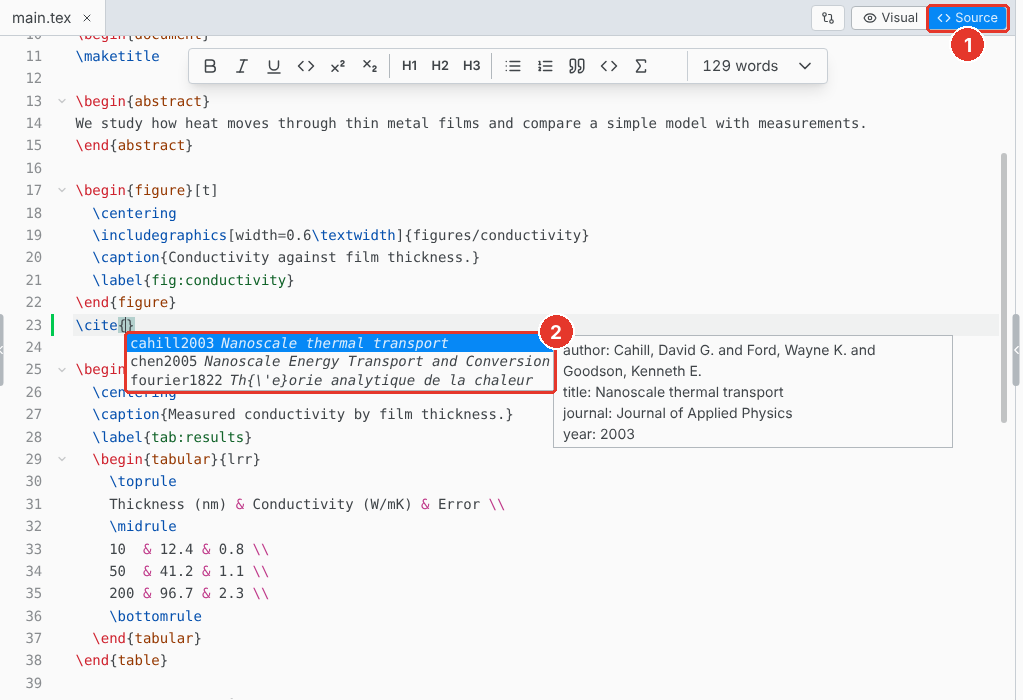
- Source. Switch to the source editor.
- Completion. Opens as you type. Ctrl Space opens it any time.
Completion covers commands (your own \newcommand macros too), environments, packages, labels, citation keys and file names. In \cite{, search by key, title or author. Type @ and a letter for a symbol: @a offers \alpha.
Go to definition and hover
F12, or Ctrl Click, on a label, a citation key, one of your own commands, or a file in \input opens where it is defined.
Hovering shows the citation's entry, the image of an \includegraphics, or the typeset equation a \ref points to.
Math preview
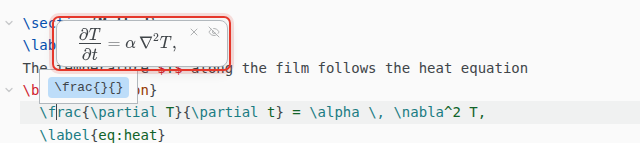
The equation under the cursor shows typeset above it. Esc hides it.
Inside math, Ctrl Space opens the symbol search the visual editor's equations have, with your math snippets in it. With Emacs keys, Ctrl Space sets the mark instead.
Symbols
Insert › Symbol… finds a symbol by command (subsetneq), by meaning (not equal) or by package. It shows the \usepackage line the symbol needs and offers to add it.
A meaning can also be what a letter stands for in a field: stress finds σ and τ, and learning rate finds η. A word with a small typo, such as lamda, still finds its symbol. The math search inside an equation finds symbols the same way.
Format Document
Format › Format Document tidies the indentation. Only spacing changes.
Keyboard shortcuts
On macOS, use Cmd for Ctrl. For Vim or Emacs keys, see File › Preferences… › Editor › Keybindings.
| CtrlSpace | Show suggestions, or the symbol search in math |
| F12 | Go to definition |
| CtrlD | Select the next match |
| CtrlAltUp | Add a cursor above |
| CtrlAltDown | Add a cursor below |
| CtrlB | \textbf{} |
| CtrlI | \textit{} |
| CtrlM | \( \) |
| CtrlShiftM | \[ \] |
| CtrlAlt1 | \section{}, with 2 and 3 for the levels below |