AI assistants (MCP)
AI assistants (MCP)
Texpile exposes a local MCP server, so an AI assistant can see what you are working on and drive the editor. It stays off until you turn it on in Preferences.
- Setting
- Preferences › MCP server Preferences opens from the start screen, and from File › Preferences… once a folder is open.
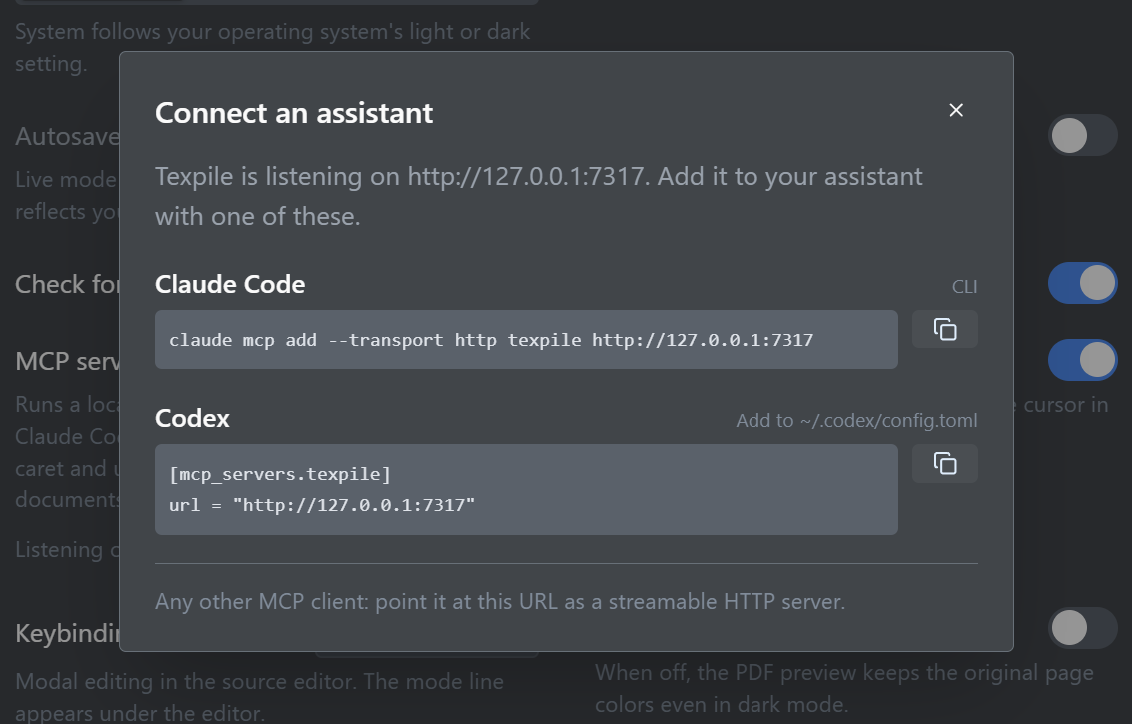
Setting it up
Preferences shows the server's address along with a ready-made command for Claude Code and a config entry for Codex. They are not interchangeable, so copy the one for your client. Preferences fills in the real port for you.
Claude Code
claude mcp add --transport http texpile http://127.0.0.1:PORTCodex, in its config file
[mcp_servers.texpile]
url = "http://127.0.0.1:PORT"
What an assistant can do
The server offers a small, deliberate set of actions rather than general access to your disk.
- Read the editor state: the open file, the current view, and the selection.
- Read content you have typed but not saved yet.
- Read the current compile errors and warnings.
- Open a file in the editor.
- Show a diff of a file.
- Switch between the visual, source, and diff views.
- Show a given source line in the PDF.
- Run a compile.
None of these edit your files. To make changes, an assistant should use its own terminal or file-editing tools on the .tex files on disk, the same as it would if Texpile were not open.
Local only
The server listens on 127.0.0.1 and is reachable only from your own machine. Texpile itself sends nothing anywhere.
What your assistant does with what it reads is between you and your assistant. If it is a cloud model, your document content reaches that provider the same way it would if you pasted it in.