Texpile
LaTeXTypst文档下载
English
简体中文
繁體中文
Overview

Get started

  • Installation
  • Getting started
  • A tour of the window
  • Command palette

LaTeX

  • Overview
  • Visual editor
  • Equations
  • Tables
  • Figures and images
  • Citations and references
  • Source editor
  • Compiling
  • Live preview

Typst

  • Overview
  • Visual editor
  • Equations
  • Tables
  • Figures and images
  • Citations and references
  • Source editor
  • Compiling
  • Live preview
  • Export
  • Templates

Markdown

  • Overview
  • Visual editor
  • Source editor

Editor tips

  • Typing and selecting
  • Paste and drop
  • Spell check
  • Split view

Workflow

  • Build and preview
  • Projects and files
  • Version control

Review and collaboration

  • Comments
  • Real-time collaboration

AI and integrations

  • AI Assistant
  • Integrations

Customize

  • Preferences
  • Themes
  • Keyboard shortcuts

Advanced

  • Snippets
  • LaTeX package files

Troubleshooting

  • General
  • LaTeX
  • Typst
  • Git
  • Shared sessions

Reference

  • Limits
  • Privacy
  • Formats
  • What's new
Customize

Themes

Preferences › Appearance has 25 color themes, each in light and dark.
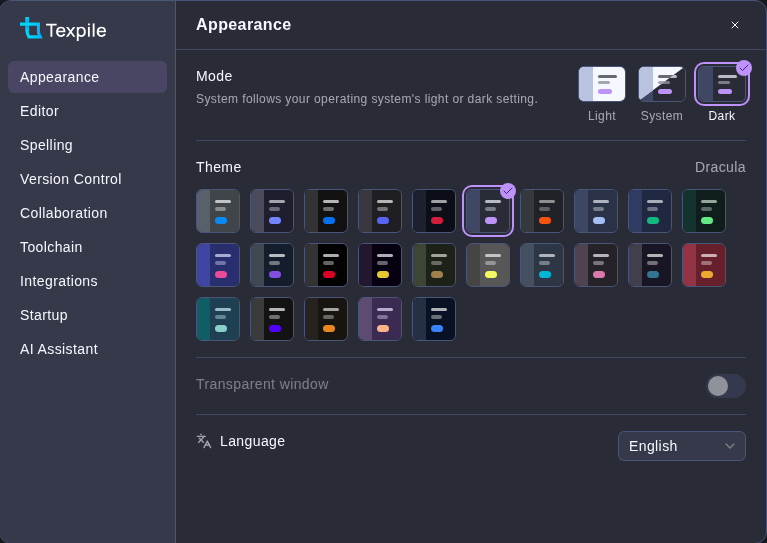
The Appearance tab in dark mode with the Dracula theme chosen, showing the Mode choice and the Theme grid

Transparent window blurs the desktop behind Texpile. Windows 11 and macOS only.

Previous Preferences Next Keyboard shortcuts

Like Texpile?

Star it on GitHub Donate