AI Assistant
Texpile includes no AI. It works with an agent you install and sign in to yourself: chat with it in the Agent tab, rewrite a selection with Refine, or let it read your editor through the MCP server. Desktop app only.
Set up an agent
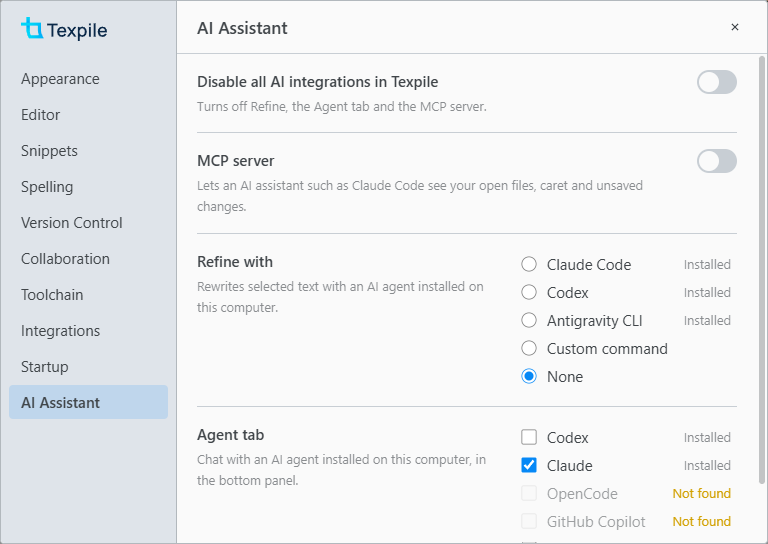
Install the agent and sign in outside Texpile, then pick it in Preferences › AI Assistant. The Agent tab and Refine each have their own choice.
| Agent | Agent tab | Refine | Sign in from a terminal |
|---|---|---|---|
| Codex | Yes | Yes | codex login |
| Claude Code | Yes | Yes | Run claude |
| OpenCode | Yes | No | opencode auth login |
| GitHub Copilot | Yes | No | Run copilot |
| Gemini | Yes | No | Run gemini |
| Antigravity CLI | No | Yes | Its own sign-in (agy) |
You can also enter your own command. For the Agent tab it must speak the Agent Client Protocol, such as opencode acp. For Refine it reads a request and prints the new text, such as ollama run llama3.1.
If an agent shows Not found, add its folder in Preferences › Toolchain › Folders, then reopen Preferences.
Turn off AI
Disable all AI integrations in Texpile, at the top of Preferences › AI Assistant, turns off Refine, the Agent tab and the MCP server. Until you pick an agent, the Agent tab also offers it as a Disable All AI button. Turn the switch off to bring back Refine and the Agent tab with your earlier choices. The MCP server stays off until you turn it on again.
What each feature sends is in Privacy.