Spell check
Texpile underlines spelling problems in English, German, French, Spanish, Italian, Dutch, Portuguese (Brazil and Portugal) and Polish, and grammar problems in English. Math, code, commands and .bib files are skipped. Turn it on in File › Preferences… › Spelling.
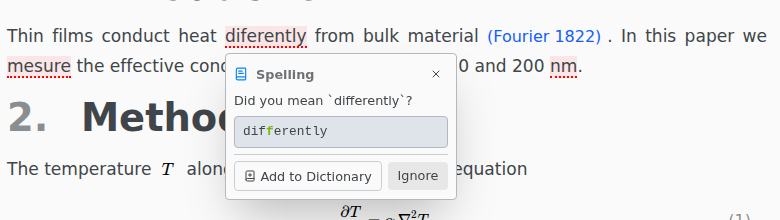
Click an underlined word for suggestions. F8 and Shift F8 jump to the next and previous problem.
For a grammar problem, the box swaps Add to Dictionary for Turn Off Rule, which stops that rule in every file. Preferences › Spelling turns it back on, and holds the English variant and your dictionary.
Languages
A document is checked in the language it names:
| Format | Example |
|---|---|
| LaTeX (babel) | \usepackage[ngerman]{babel} |
| LaTeX (polyglossia) | \setmainlanguage{french} |
| Typst | #set text(lang: "es") |
| Markdown | lang: it in the front matter |
A chapter brought in with \input or #include follows its main file. Any other document is checked in Preferences › Spelling › Default language, which starts as English. Only the languages above have dictionaries, so a document in another language, such as Russian, is skipped.
Spelling › Folder Language, or Preferences › Spelling › This folder, sets one language for every file in the folder, over what the files name. It is saved in the folder's .texpile/config.json, so co-authors get it too. Automatic goes back to what each file names, and says where its language comes from: the document, or the default.
Each language has its own dictionary: Add to Dictionary on a German word adds it to the German one. Preferences › Spelling › Custom Dictionary shows one language at a time.